I’ve upgraded routers expecting a real jump in performance more times than I can count.
Most of the time, nothing noticeable changes in real use. Netflix still buffers at night, video calls still lag during peak hours, and the only obvious difference is a newer box sitting on the shelf.
Do I actually need a new router?
Most of the time, no. A new router only makes a noticeable difference if your current one is outdated (Wi-Fi 4 or early Wi-Fi 5), overloaded with devices, or unstable. In many US and European homes, slow internet is caused by ISP congestion, device limitations, or home layout — not the router itself.

The setup I tested this on (and how I actually verified it wasn’t just the router)
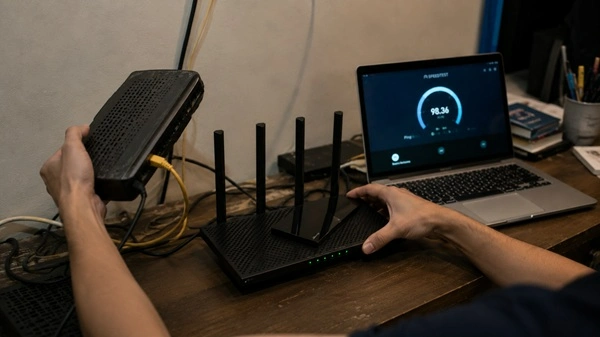
I didn’t just swap routers and eyeball the results. I tried to isolate what was actually causing the slowdown.
Hardware I used in the test
- Old router: ISP-provided dual-band gateway (typical bundled unit from a cable/fiber provider in the US/EU market)
- New router: TP-Link Archer AX21 (Wi-Fi 6 retail router, AX1800 class)
- Primary device: iPhone 11 (older Wi-Fi 5 generation phone)
- Secondary device: Dell XPS 13 laptop (Wi-Fi 6 capable)
- Smart TV: Samsung 2019 model (Wi-Fi 5 only)
This mattered because I wasn’t testing in a clean, single-device setup. I was testing what most real homes actually look like — mixed hardware, not uniform devices.
How I proved it wasn’t just the router
This is the part most articles skip, but it’s the real diagnostic step.
Step 1: Wired baseline test (ISP check)
At around 9:30 PM (peak usage hours), I plugged a laptop directly into the modem using Ethernet.
- Download speed: dropped significantly compared to off-peak results
- Latency: increased noticeably
- Stability: inconsistent even on a wired connection
Conclusion: the slowdown was happening before Wi-Fi even came into the picture.
That alone pointed strongly toward ISP congestion, not router performance.
Step 2: Wi-Fi comparison test (before vs after upgrade)
Then I repeated the same tests over Wi-Fi:
- Old router (ISP gateway): similar performance to wired bottleneck
- New router (TP-Link AX21): slightly better stability, but same overall ceiling
The pattern stayed identical. The router changed the signal quality slightly, but it didn’t change the maximum usable performance during peak hours.

What actually changed between devices
This part became obvious once I tested across multiple devices.
- iPhone 11 (older Wi-Fi chip): almost no visible improvement
- Dell XPS 13 (Wi-Fi 6 support): slightly better stability and faster reconnects
- Smart TV (Wi-Fi 5): unchanged buffering behavior
So the upgrade didn’t create a “faster network.” It created uneven improvements depending on the device.
What this actually proved
After isolating variables, the conclusion was simple:
- If Ethernet speeds drop → ISP is the bottleneck
- If only some devices improve, → device capability is the bottleneck
- If coverage issues remain in the same spots, → physical layout is the bottleneck
In my case, the router was never the main constraint. It just sat in the middle of a system that was already limited elsewhere.
The real bottlenecks hiding behind the router
In most US and European home setups, the router is rarely the main reason Wi-Fi feels slow or unstable. It’s usually just the most visible piece of the system, not the weakest one.
1. ISP congestion (especially cable broadband in the US)
Even with a high-end router, the connection often hits limits before it even reaches your home network.
On US cable (DOCSIS) connections, performance tends to drop during peak evening hours because bandwidth is shared across entire neighborhoods. A router upgrade doesn’t change that upstream congestion at all.
In many European setups, the issue can look slightly different depending on region — fiber tends to be more stable, but mixed infrastructure areas still show peak-time slowdowns that sit outside the home network entirely.
2. Device capability limits the experience
In real-world use, not every device benefits equally from a better router.
Newer laptops and phones usually connect more efficiently and maintain stronger speeds. Older devices, especially older smart TVs and budget laptops, often stay capped at lower performance levels regardless of router upgrades.
What this creates is an uneven network experience. Some devices feel faster, others feel unchanged, even though nothing is “wrong” with the router itself.
3. Home layout and environment shape signal more than specs
In a typical US suburban home, signal issues often come from structure rather than distance alone. Multiple drywall layers, floors, and room separation gradually weaken performance as you move away from the router.
In European apartment buildings, the pattern shifts. The bigger issue is often not walls but interference — dozens of nearby networks competing in close proximity.
A faster router doesn’t change how radio signals behave in physical space.
The part no one mentions: upgrades can feel more complicated than expected
This is where router upgrades stop feeling like simple improvements and start feeling like small network projects.
1. Setup overhead increases
Modern routers are rarely just plug-and-play anymore.
Most come with:
- mobile apps that replace traditional settings pages
- automatic band steering that sometimes needs manual adjustment
- multiple configuration layers like guest networks, QoS controls, or mesh pairing
What used to be a five-minute setup can turn into a short tuning process, especially if you have multiple devices already connected.
2. Performance isn’t immediately stable after upgrading
Right after switching routers, behavior across devices can feel inconsistent.
Some devices connect to faster bands immediately. Others stay on older connections until they are manually reconnected or left to adjust over time.
In mixed-device households — especially ones with older smart TVs, IoT devices, and older laptops — it can take time before the network settles into a stable pattern.
When the upgrade actually makes sense
I’m not saying upgrades are pointless. They just depend heavily on context.
A new router tends to matter when:
- You’re upgrading from Wi-Fi 4 or early Wi-Fi 5 hardware
- You have gigabit fiber and need to actually distribute that speed
- You run high device density (streaming, gaming, smart home all at once)
- You’re using mesh systems to fix multi-room coverage properly
Outside of that, improvements are often incremental rather than transformative.
| Scenario | Wi-Fi 5 Router | Wi-Fi 6 Router | Real Difference |
|---|---|---|---|
| Streaming (off-peak) | Stable | Stable | None |
| Streaming (peak hours) | Buffering | Buffering | None |
| Video calls | Occasional lag | Slightly smoother | Minor |
| Speed tests | ~100–130 Mbps | ~120–150 Mbps | Small gain |
| Multi-device load | Noticeable slowdown | Slight improvement | Moderate |
The pattern is consistent: measurable improvement in controlled conditions, minimal change in real-world frustration points.
What actually changed after upgrading
The biggest shift wasn’t performance. It was an expectation.
I stopped assuming the router is the default problem.
In most US and EU households, Wi-Fi issues usually come from a stack of constraints:
ISP congestion, device mix, and home layout. The router is just one layer in that system, not the dominant one.
Final takeaway
After enough router upgrades, the pattern becomes obvious. A new router can improve parts of the network, but it rarely changes the real-world experience unless the old hardware was clearly the bottleneck.
Most Wi-Fi problems don’t come from a single weak point. They come from a mix of ISP congestion, device limitations, and home layout constraints. The router is just one layer in that system.
At this point, I don’t treat router upgrades as fixes anymore. I treat them as targeted replacements.
People Also Ask These Questions
Why is my Wi-Fi still slow after upgrading my router?
In most cases, the upgrade doesn’t fix ISP congestion or peak-hour slowdowns. If your internet is slow at night, the issue is usually your provider’s network, not your router hardware.
Does a better router actually increase internet speed?
Only in limited cases. A better router improves local network performance (Wi-Fi stability, device handling), but it cannot exceed your ISP speed plan or fix external congestion.
How do I know if my router is the problem or my internet?
A simple test is to plug your device directly into the modem using Ethernet. If speeds are still slow, the issue is your ISP. If speeds improve significantly, your router or Wi-Fi setup is the bottleneck.
When should I replace my Wi-Fi router?
You should consider upgrading if:
- Your router is more than 4–5 years old
- You are using Wi-Fi 4 or early Wi-Fi 5 hardware
- You experience frequent disconnects even on Ethernet-free local use
- You have many connected devices (10–20+)
Is Wi-Fi 6 worth it for home use?
Wi-Fi 6 helps mainly in high-device environments like busy households or apartments. For basic browsing and streaming on a 100–300 Mbps plan, the difference is often minimal in real-world use.
Why does Wi-Fi work in one room but not another?
This is usually caused by physical barriers (walls, floors, appliances) or interference from nearby networks. In US homes, drywall and floor separation matter. In European apartments, dense neighboring networks often increase interference.